


Docs navigation
What's new
Latest updates, new features, and improvements to Streamrun.
Live captions beta
Streamrun now turns speech into live subtitles in the cloud, as closed captions viewers switch on and off, or burned into the picture so they show on every platform.
Recognition runs on the audio Streamrun receives, so OBS, a phone app, or a hardware encoder all work without plugins. Captions are in beta, and each Captions element is a Streamrun Pro add-on billed while the stream is live.
Three ways to show captions
- CTA-708 closed captionsEmbedded in the video stream, so viewers turn them on and off in the player.
- Burned in, multiple linesDrawn into the picture two lines at a time, so they show on every platform and player.
- Burned in, word by wordDrawn into the picture as the words are recognized.
55 languages, with Custom terms for names and words the recognition keeps getting wrong.
October 2, 2026
Starting soon scene, BRB, and chat positions in Streamrun Go
Starting soon scene
Streamrun Go can now show an image or play videos at the start of your stream while you get ready. Add your files to the Stream starting soon card on your Go page, or create an image with AI. When you are ready to go on camera, select Input 1 or Input 2 in Remote Control.
BRB
You can now show your failover image or videos during a break. Select BRB in Remote Control while your inputs stay connected. If you have not added your own files, viewers see the default BRB image.
New switch in Remote Control
Each Go input now has a preview with its bitrate and frame rate, plus warnings for video format or codec problems. You can select your starting soon scene or BRB alongside the inputs.
More chat overlay positions
You can now place chat in a bottom corner or along the full height of either side of your stream. Top corner positions are still available. Choose the position on your Go page before you start the session.
September 25, 2026
Shared inputs
Shared inputs let you give another Streamrun user or organization access to your incoming stream. They can use it in their own configuration or in Streamrun Go. For example, IRL streamers meeting up can share their camera feeds with each other and switch between them during the stream. At events, a single device can feed several configurations when part of the program is shared and part is channel-specific. Your stream URL and stream key are never revealed.
Create a share from Settings → Shared inputs. You can share an input from any configuration, or Input 1 or Input 2 from Streamrun Go. Shares can expire after 24 hours, 7 days, or 30 days, or never expire, and can be revoked at any time.
To use an input shared with you in the Streamrun Editor, select it from the Input type dropdown of an Input Stream element under Shared with you. In Streamrun Go, select Use shared input on Input 1 or Input 2 and choose the shared input.
September 10, 2026
Streamrun Go upgrades
Chat overlay
Streamrun Go can now render your live chat on top of your stream, with support for Twitch, Kick, and YouTube chat. Choose Left or Right on your Go page before you start the session. The chat channel comes from your connected destination.
The overlay is rendered on the server, so it costs your phone no battery or processing power, and it works the same whether you stream from an app, an encoder, or straight from a camera. It shows one channel at a time and it is available on standard horizontal streams or the horizontal stream in Dual outputs.
YouTube Dual Stream
YouTube Dual Stream is now available on Streamrun Go, alongside Twitch Dual Format. Enable Dual stream in YouTube Studio, add both the horizontal and the vertical stream key to your YouTube destination, then select that destination as your only destination on the Go page. Streamrun generates the vertical version in the cloud.
- Streamrun Go documentation →
- YouTube Dual Stream setup guide →
- HTML Overlay: Streamrun Pro users can build custom chat overlays with any overlay URL.
Launch: Live captions
The new Captions element turns speech into live subtitles in the cloud. Captions can travel with the stream as CTA-708 closed captions that viewers switch on and off, or be burned into the picture so they show on every platform and player. Recognition runs on the audio Streamrun receives, so OBS, a phone app, or a hardware encoder all work without plugins.
Captions are in beta. Recognition quality depends on audio quality, accent, and vocabulary, and Custom terms can be used to fix names and other words the recognition keeps getting wrong. Each Captions element is a Streamrun Pro add-on billed on top of the configuration's base price while the stream is live.
Fixes and improvements
- HTML Overlay: Custom CSS can now be injected into the page the overlay loads. Useful for hiding parts of a third party overlay, changing fonts and colors, or adjusting the layout without hosting your own copy of the page.
- Destinations: YouTube stream keys are now fetched automatically when you connect a YouTube account. The vertical key for YouTube Dual Stream still has to be copied over from YouTube Studio by hand.
- REST API: New endpoints for starting and stopping a Streamrun Go session, and for checking whether one is running.
- Input stream: OPUS audio is now supported with every streaming protocol. Previously it worked with SRTLA only.
- Streamrun Pro: Improved the restart flow for configurations running on a dedicated server.
August 19, 2026
Launch: YouTube Dual Stream support
Streamrun now supports YouTube Dual Stream, so a single output can deliver both a horizontal and a vertical version of your stream on YouTube. Add an Output stream element of type "YouTube Dual Stream", and Streamrun can generate the vertical version for you.
YouTube requires a separate stream key for each orientation. Enable Dual stream in YouTube Studio, create one stream key for horizontal and one for vertical, then add both to your YouTube destination in Streamrun.
Fixes and improvements
- Configuration duplication: Added a "Duplicate configuration" button to the configuration page's Danger Zone in the bottom-right corner. This creates a separate copy of the configuration that you can edit.
- Destinations: Added support for the
{streamId}placeholder in destination URLs, allowing the stream key to be inserted anywhere in a custom URL. For example,srt://host?streamid={streamId}&latency=500000with a stream ID of 1234 becomessrt://host?streamid=1234&latency=500000. - REST API destinations: Added API support for fetching preconfigured destination platforms and creating or updating custom RTMP/SRT destinations.
- REST API credits: New endpoint for retrieving the account's credit balance and the estimated cost of currently running streams.
- HTML Overlay: Increased the maximum delay from 4 to 6 seconds.
- Vertical frame: Fixed an issue where outputs started with "Set outputs live" could go live before the vertical frame size was applied.
June 18, 2026
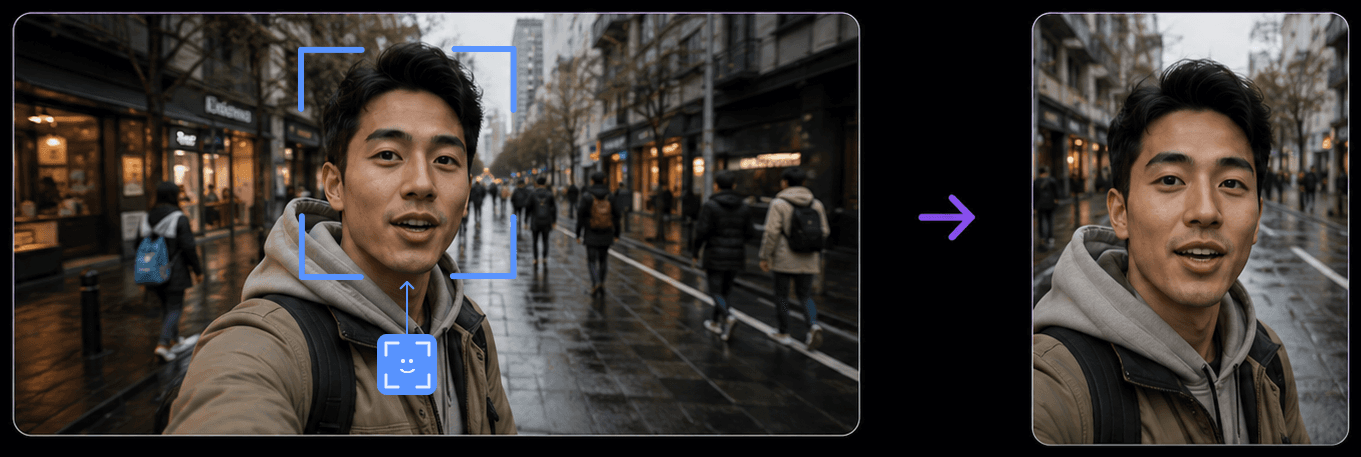
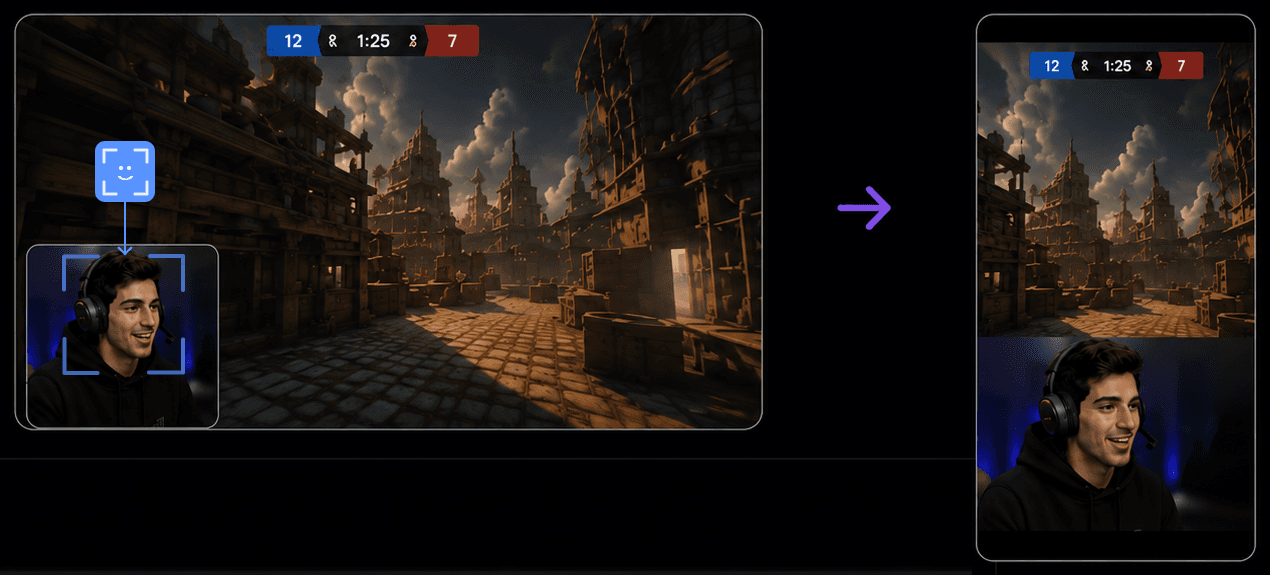
Launch: Automatic Vertical Framing for Twitch Dual Format
Streamrun already supports Twitch Dual Format natively. The new Automatic Vertical Framing layer builds the vertical version for you in the cloud, so one stream delivers both horizontal and vertical viewing experiences on Twitch, without a second device, plugin, or local encoder output. The same launch also improves Streamrun's Vertical frame element for creators who stream beyond Twitch. Twitch made Dual Format generally available to all streamers on June 17, 2026 (see Twitch's announcement and Dual Format docs).
- Streamrun Go: fully automatic setup, with live subject tracking for IRL and general content plus automatic webcam extraction for gaming content.
- Streamrun Pro: everything in Go, plus custom framing, a custom vertical canvas, and multistreaming the vertical feed to TikTok and YouTube Shorts with the Vertical frame and Output stream elements.
IRL and general content with subject tracking
Gaming content with webcam extraction
June 12, 2026
Multi-video playback
You can now select multiple video files and play them seamlessly without gaps between clips. Select multiple clips and play them randomly to keep viewers engaged during connection issues, or play sponsor messages sequentially during breaks.
- Streamrun Go: when failover kicks in, multiple selected videos are played in random order.
- Streamrun Pro Video Player: select multiple video files and choose whether they are played in random order or sequentially.
June 4, 2026
Updates and Improvements
- Streamrun Go: Added support for vertical streaming.
- HTML Overlay: Added zoom setting to reduce or increase text and other element sizes.
- Remote Control: Added “Kill outputs” option to forcefully stop outputs instead of graceful shutdown, allowing platform-specific (e.g., Twitch) disconnect protection to activate immediately.
- File uploads: Fixed a bug affecting uploads over 2 GB.
- PNG Overlay: Improved handling for RGB images (non-RGBA).
- Audio sync: Improved sync recovery after network glitches.
May 12, 2026
Multi-track audio and Twitch VOD tracks
Streamrun Pro now supports receiving two audio tracks from incoming streams and routing them separately to output destinations. This enables Twitch VOD tracks, where one audio track is used for the live broadcast and another for archived VOD recordings. It can also be used to send different audio tracks to different platforms, such as Twitch and YouTube simultaneously. To enable VOD track support for non-Twitch platforms in OBS, add EnableCustomServerVodTrack=true to your OBS user.ini file.
Other improvements
- Video player: Improved playback with instant start. Videos now begin immediately without pre-processing delays.
- REST API: Added an
autoStopfield to the launch instances endpoint. Settrueto always stop when idle,falseto keep running indefinitely, or leave empty to use the account-level setting. - Output stream: Added an option to the Run modal to automatically set outputs live when starting a configuration, making stream startup workflows faster and more streamlined.
April 14, 2026
Organizations and team collaboration
You can now create organizations and invite your team members or moderators to collaborate on live streams and configurations.
- Switch between organizations using the new sidebar switcher, and manage members from the updated Settings page.
- Organization members get full access to configurations, destinations, files, and settings, so your team can build and run streams together. Billing and member management remain restricted to the organization owner.
- All resources, including configurations, destinations, files, subscriptions, and credits, are organization-specific.
- Exception to organization scope: the Dashboard shows running streams across all organizations, so you can always see what’s live.
March 18, 2026
REST API
- New endpoints to manage output destinations: create, update, or delete a stream destination.
- Changed the Input Stream RTMP/SRT pull behavior to allow restarting after failed attempts. The pull is attempted up to 10 times. If the other end is offline, it enters a failed state. Previously, the pull had to be stopped before a new attempt could be started.
Other changes
- Fixed Dual HD 1760 and Dual HD 2000 resolution detection in the Input Stream element. Dual HD lets you stream simultaneously in horizontal and vertical orientations using a single extra-large canvas, supported by any desktop streaming software.
- Internal networking changes improve stream reliability but do not automatically enable the AV1 codec. To use AV1, enable it in the Input Stream element's advanced settings. We recommend HEVC over SRT for the best quality/reliability balance.
- Maximum SRTLA latency set to 4000 ms. Keep your device's latency setting at or below this value.
March 6, 2026
New API endpoint: Instance actions
- Input Stream: start or stop RTMP/SRT pull.
- Video Player: control playback (play, pause, stop, restart).
- HTML Overlay: reload HTML.
Other improvements
- ingest.streamrun.io now returns IPv4 addresses only due to IPv6 connectivity issues from several customer networks. To continue using IPv6, use ingest-ipv6.streamrun.io.
- If you experience low bitrate despite a fast connection, consider switching from RTMP to SRT. RTMP is sensitive to packet loss due to TCP congestion control. SRT handles packet loss significantly better. Read about SRT setup.
- Bug fixes and stability improvements. The Video Player now handles a flickering input stream more gracefully when used as a failover.
February 13, 2026
Audio handling
Launched a higher-quality audio encoder and started handling audio internally with twice the dynamic range. This improves quality when mixing overlay sounds with stream audio. Also improved the Noise Cancellation element to keep non-processed audio in stereo.
REST API
- Set all output elements live or offline.
- Set a specific output element live or offline.
- Set a specific destination of a specific output element live or offline.
- Return information about the instance's state (inputs and outputs, with more elements to be added).
February 3, 2026
Streaming engine upgrade
Major upgrades to the streaming tech under the hood. Improves reliability and accelerates future feature development.
HTML Overlay element
- Rendering delay: sync the overlay with video. Useful for sports streaming where score updates might otherwise appear before the goal is visible due to encoding latency.
- Audio gain: control the amplification of the HTML Overlay's audio signal.
REST API
- Instance listing endpoints now return the stream key. The final stream key in each input element is prefixed with the element ID, e.g.
inputstream-1/<stream-key>. - Fixed issues with the settings override
PATCHcall. A switch element can now be operated via API.
December 15, 2025
New element: Picture in Picture (beta)
Combine two inputs on the same canvas. Display one video on top of another, or place sources side by side for multi-source and interview-style layouts.
Vertical Frame: facecam extraction
Extract and crop the facecam from the incoming stream and display it as a separate element in the vertical frame. Makes it easier to create native-looking vertical layouts from a single horizontal source.
December 9, 2025
- Invite and earn: Invite friends to Streamrun and earn up to 50% of their first purchase as credits. Find your invite link at the bottom of the billing page.
- HTML Overlay: added support for soundalerts.com and fixed a bug that sometimes caused overlay sounds to fail when multiple HTML overlays were used in one configuration.
- Ingest servers: added IPv6 support to all ingest servers, improving connection reliability for mobile users on IPv6-only and IPv6-mostly networks.
- Video Player: added a “Play automatically” setting. When enabled, playback starts when the configuration starts. Useful for “Stream Starting Soon” videos. Also improved performance with large video files.
November 27, 2025
Streamrun Go price reduced to $25/month for both new and existing users, thanks to infrastructure optimizations. See Streamrun Go features →
- Vertical Frame: added more zoom and crop options, plus the ability to shift the crop horizontally.
- Input Stream RTMP/SRT pull: new option to start pulling automatically when the configuration starts.
- Output Stream: added support for custom output destinations over SRT.
- SRTLA: reliability improvements (protocol support remains in beta).
- HTML Overlay: fixed a bug causing overlay positioning to not always work correctly.
November 6, 2025
Batch Launch
Multiple instances can now be started from the dashboard or with a single API call. Useful when multiple streams need to run simultaneously, such as streaming several football fields, tennis courts, or event stages to different outputs.
REST API (early beta)
Streamrun REST API is now available in early beta. Control configurations, launch instances, and list destinations. API keys can be created on the API keys page. See API documentation →
October 14, 2025
Twitch Dual Format Streaming
Simultaneous horizontal and vertical broadcasts on Twitch. With Streamrun, you can stream in Dual Format from any device or software, using automatically generated vertical video or manually created layouts.
September 22, 2025
Streamrun Go
Previewing flat-priced subscription plan. Streamrun Go gives you unlimited streaming for a flat fee, including two video inputs, disconnect protection with failover, AI-powered noise cancellation, and two output destinations.
September 10, 2025
SRTLA support
Input Stream elements now support SRTLA, an extension of SRT that supports connection bonding. Compatible software can stream over multiple networks simultaneously (mobile + Wi-Fi) to improve resilience against network hiccups. SRTLA adds extra latency since the server waits for packets across all bonded networks.
Input Stream documentation →Older updates
- Input Stream: RTMP/SRT Pull feature
- New element: Video Player for fallback content in failover and upload-and-stream workflows
- Improved Remote Control
 Join Streamrun Discord