


Full Control Over Your Live Streams
Streamrun Pro provides a visual workflow editor, per-destination controls, dual format streaming, and API access so you can build exactly the setup your live streams need.
Free to set up. Pay only when you go live.
Build workflows that match how you actually work
Most streaming tools give you a fixed pipeline: one input, a few outputs, maybe some overlays. Streamrun Pro works differently. You get a visual editor where you connect elements such as inputs, switches, splitters, overlays, and outputs into any arrangement you need.
Switch between inputs mid-broadcast. Send different graphical overlays to each platform. Route one input to a horizontal and vertical output simultaneously. The workflow is yours to design.
Visual workflow editor
Drag, connect, and configure your streaming setup in a node-based editor. Add elements like input sources, failovers, overlays, and output destination.
Connect them in any order to create workflows that fit your production. No code required for visual setup.
Learn about Streamrun Editor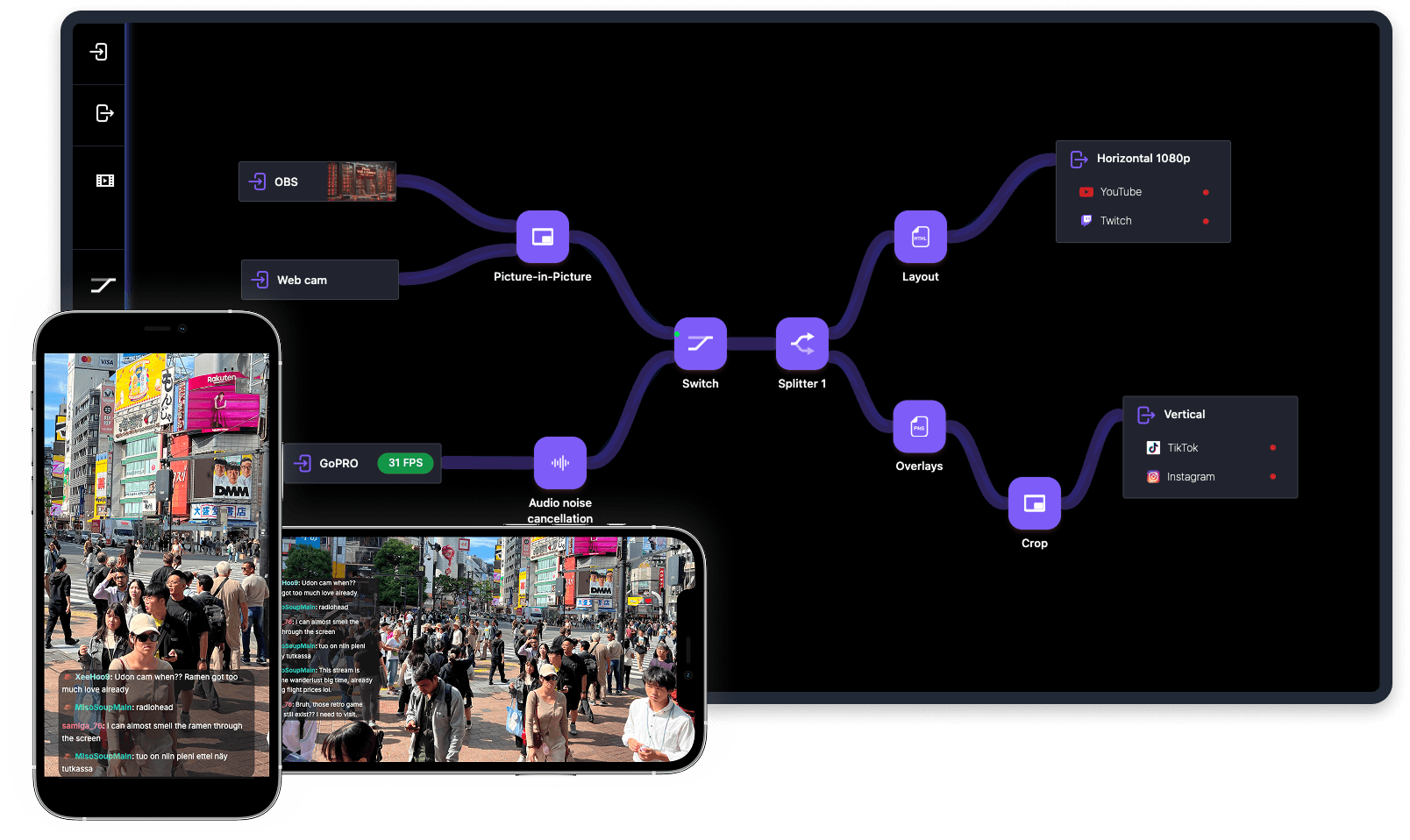
Every element available
Streamrun Pro gives you access to every element on the platform. Combine them to handle simple setups or complex multi-camera, multi-platform productions.
Input Stream
Accept streams from OBS, vMix, GoPro, Moblin, IRL Pro, or any other source over RTMP/SRT/SRTLA.
Output Stream
Send to Twitch, YouTube, Kick, TikTok, or any custom RTMP/SRT server.
Switch
Switch between inputs in real time. Go from desktop to mobile without dropping the stream.
Splitter
Route one input to multiple outputs with per-destination encoding settings and graphics.
Failover
Automatically switch to a backup source or fallback content when the main input drops.
Picture in Picture
Compose multiple inputs into one output: overlay, side-by-side, or custom layouts.
Video Player
Play uploaded MP4 videos as primary content or as fallback during disconnects.
HTML & PNG Overlays
Add graphics, logos, web-based widgets, or live data displays over your stream.
Noise Cancellation
AI-powered audio cleanup removes wind, traffic, and crowd noise in the cloud.
Live Captions
Highly accurate speech recognition adds live captions in the cloud, as closed captions or burned into the video, as a $0.40 per hour add-on.
Vertical Frame
Convert horizontal video to vertical with an auto-generated blurred background.
Test Signal
Generate a test signal without an input stream for setup and troubleshooting.
Per-destination controls
Set independent encoding, resolution, and bitrate for each output destination.
Dual format streaming
Stream in horizontal and vertical formats at the same time from a single input. Reach desktop viewers on Kick, mobile audiences on TikTok and Instagram, and both on Twitch and YouTube without running separate broadcasts.
Automatic vertical conversion
The Vertical Frame element converts your horizontal stream into a vertical format with an auto-generated blurred background. No extra software or encoding on your end.
Custom vertical layouts
Use Picture in Picture, overlays, and the splitter to create a purpose-built vertical output with its own graphics and composition.
Twitch Enhanced Broadcasting
Send both horizontal and vertical streams to Twitch simultaneously so viewers get the right format for their device.
Per-destination encoding
Set resolution, bitrate, and codec independently to match each platform.
Automation and REST API
Developers can control streams programmatically with the REST API. Start and stop sessions, update configurations, switch inputs, and monitor status from your own tools or scripts.
Custom workflows vs. templates
Start from a pre-built template or design your workflow from scratch. Templates cover common setups like IRL streaming with failover, dual format multistreaming, and multi-camera switching.
When you need something specific, the Streamrun Editor lets you build it. There are no locked features or artificial limits on how elements connect.
See Streamrun in action
A quick overview of the editor and how to use it to connect elements for a custom streaming setup.
Built for users who need control
Streamrun Pro is used by creators who have outgrown simple tools, production teams running live events, developers integrating streaming into their platforms, and agencies managing streams for clients.
Power creators
Give each platform its own graphics and video format, with fallback content when your source disconnects.
Production teams
Switch cameras during live events and send each destination its own graphics and encoding settings.
Developers
REST API access for building streaming into your own products. Start sessions, manage inputs, and monitor health programmatically.
Streaming services
White-label streaming infrastructure with full control over encoding, routing, and output configuration.
Event companies
Send conferences, sports, and live entertainment to event channels and sponsor destinations from one input.
Agencies
Manage streaming for multiple clients with custom workflows, branded overlays, and independent output configurations.
Pay only when you go live
Create your account for free. Build and test configurations at no cost. You only pay for active streaming time, billed per second.
Pay-as-you-go, billed per second. No commitments or contracts. Free to sign up, build, and test.
- Full visual workflow editor
- All Streamrun elements available
- Per-destination encoding and controls
- Dual format streaming
- Multistream to any platform
- Live captions as an add-on
- REST API access
- No commitments or contracts
Prefer a flat monthly fee? Streamrun Go is $25/month with unlimited streaming hours
Start building your workflow.
Sign up for free, design your configuration in the visual editor, and go live when you're ready. No upfront cost.
Sign Up FreeFree to build and test. Pay only for live streaming time.