


Docs navigation
Remote Control
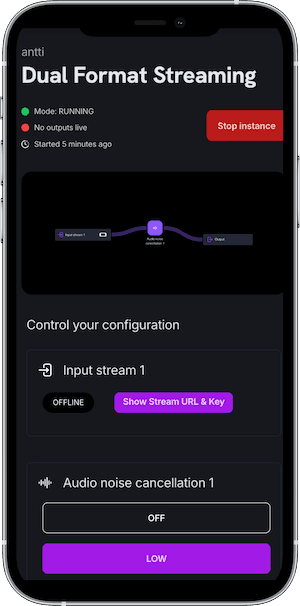
Remote Control is a mobile-optimized interface for managing your stream while live. It gives you direct access to the controls you need most during a broadcast: switching inputs, taking destinations on and offline, toggling overlays, and monitoring stream status. No need to touch the Streamrun Editor once you go live.
Access Remote Control at streamrun.com/apps/running. Bookmark it on your phone for quick access during streams.
What you can control
Remote Control surfaces the most commonly used live controls in a layout designed for small screens and quick taps.
Switch input sources
Switch between cameras or devices without interrupting the broadcast. In Streamrun Go, each input has a preview, bitrate, and frame rate. Select Stream starting to show your starting soon scene, or BRB to show your failover image or videos during a break.
Manage output destinations
Take individual destinations live or offline with a single tap. If you want to cut one platform while keeping others running, or add a destination mid-stream, this is where you do it.
Trigger failover
Manually trigger the failover element to switch to your backup video or image. You can also switch back to the live input when it recovers.
Toggle overlays
Show or hide HTML and PNG overlay elements in real time. Useful for lower thirds, alerts, or sponsor graphics that you want to control manually during the stream.
Noise cancellation
Enable or disable AI noise cancellation while live. Turn it on when moving through loud environments and off when audio conditions improve.
Monitor stream status
See which inputs are connected, which outputs are live, and whether any elements have issues. Gives you situational awareness without opening the full editor.
Remote Control vs. Streamrun Editor
The two interfaces are designed for different stages of a stream.
Streamrun Editor →
For building and configuring your setup before going live. Add elements, connect sources to outputs, adjust encoding and overlay settings. Designed for desktop.
You can make changes mid-broadcast, but the interface is not optimized for live control.
Remote Control
For managing the stream while live. Works on any device with a browser, optimized for phones and tablets.
Use this instead of the Editor once you go live. Keep it open on your phone while the Editor runs on a laptop if needed.
Related
Streamrun Editor
Build and configure your stream layout before going live.
Streaming Modes
How editing mode and running mode differ, and when to switch.
Failover
Automatically or manually switch to a backup when the input drops.
Output Destinations
Configure where your stream is delivered: Twitch, YouTube, Kick, or any RTMP endpoint.
 Join Streamrun Discord