


Docs navigation
Multistreaming
Multistreaming works best when your device sends one stable stream to Streamrun, then Streamrun delivers separate outputs to Twitch, YouTube, Kick, TikTok, Instagram, or any RTMP/SRT destination. This avoids multiplying local encoder load and upload bandwidth for every platform.
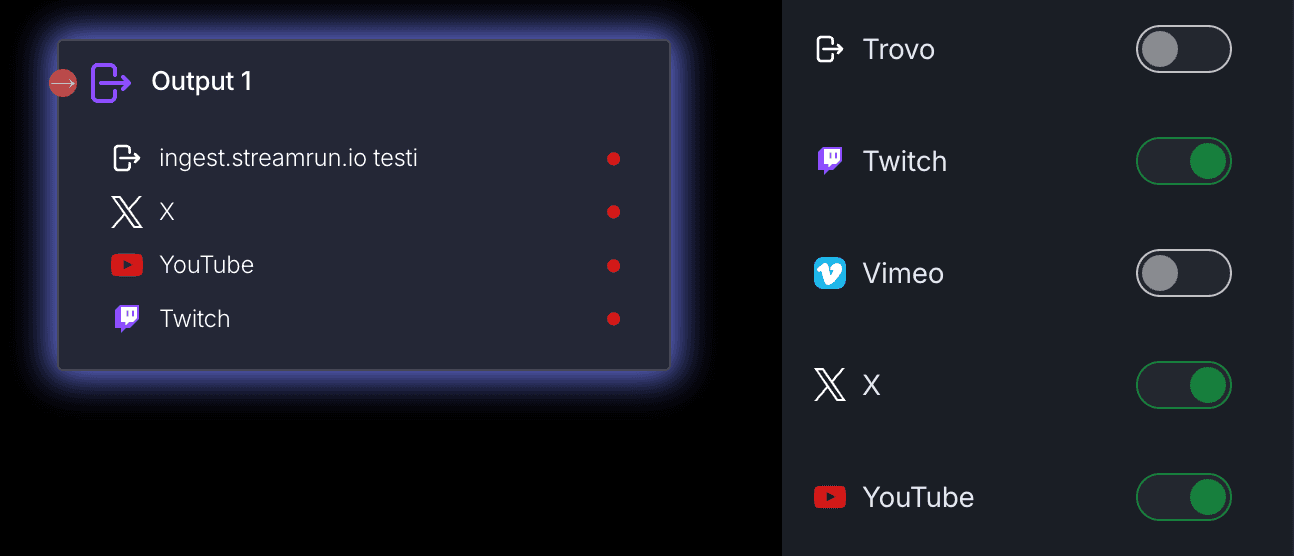
Recommended workflow
Send one input to Streamrun
Use OBS, a mobile app, a camera, or an encoder to send one RTMP, RTMPS, SRT, SRTLA, or RIST stream into Streamrun.
Input Stream docs →Add your destinations
Connect Twitch, YouTube, Kick, or any custom RTMP/SRT endpoint once, then reuse those destinations in your configurations.
Output Destinations docs →Enable the destinations on an Output Stream
Each Output Stream element can publish to one or more destinations. You can toggle individual platforms live or offline without restarting the whole stream.
Output Stream docs →Split when platforms need different settings
Use a Splitter when one platform needs a different bitrate, resolution, overlay, horizontal layout, or vertical layout.
Splitter docs →Why this reduces lag
Lag during multistreaming usually comes from one of three places: the encoder cannot keep up, the upload connection is saturated, or one platform receives settings it does not handle well. Streamrun moves the duplicated work into the cloud, so your local setup only has to maintain one encode and one upload.
Encoding load
One local encode is easier to keep stable than separate outputs for every platform.
Upload bandwidth
A 6 Mbps input remains one upload from your device instead of becoming 12, 18, or 24 Mbps locally.
Platform settings
It is enough for Streamrun to receive the highest bitrate version of your stream. Lower bitrate and resolution outputs for other platforms are produced in the cloud.
Troubleshooting lag
Dropped frames from your encoder
Lower the input bitrate, switch from RTMP to SRT if possible, or reduce resolution/frame rate until the upload has headroom.
Encoding overloaded in OBS
Use hardware encoding, simplify the scene, reduce frame rate, and avoid producing multiple local outputs.
One platform buffers but others are fine
Check that destination separately. Use a Splitter and Output Stream branch with platform-specific bitrate, resolution, or keyframe settings.
Mobile IRL stream becomes unstable
Prefer SRT, or SRTLA or RIST for bonding, keep the phone workload simple, and let Streamrun handle multistream delivery and disconnect protection.
Related
Output Destinations
Connect the platforms and custom endpoints your streams can publish to.
Output Stream
Configure encoding, output type, and enabled destinations.
Dual Format Streaming
Send horizontal and vertical versions from the same live session.
IRL Streaming
Use Streamrun from a phone or portable encoder on unstable networks.
 Join Streamrun Discord