


Docs navigation
Instagram Live
By default, Instagram Live is limited to the Instagram app. To stream from external software like Streamrun, OBS Studio, or any third-party tools, you need to switch your account to a Creator or Business account. This unlocks Instagram's Live Producer feature, which enables streaming from outside the app.
Step 1: Switch to a Creator or Business account
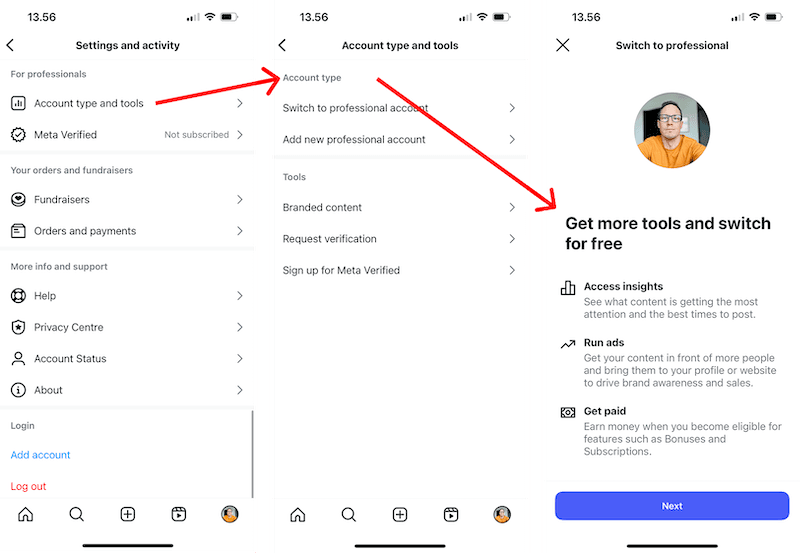
Switching account type is free and takes effect instantly. In the Instagram app, go to Settings → Account type and tools → Switch account type.
Step 2: Get your stream key from Instagram
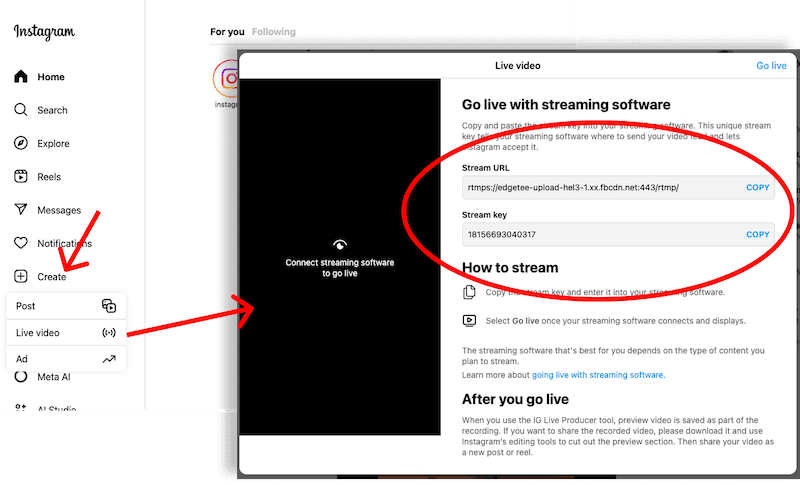
Once switched to a Creator or Business account, visit instagram.com, click Create, select Live video, and copy the Stream URL and Stream key from the pop-up window.
Add these to a new Streamrun output destination to start streaming to Instagram Live.
 Join Streamrun Discord