


Automatic Dual Format Streaming for Live Creators
Send one live stream to Streamrun and get both horizontal and vertical outputs delivered automatically. The vertical version is built live with auto-framing, while your horizontal continues as normal.
Automatic vertical streaming is powered by live AI auto-framing. For IRL, Streamrun follows the person on screen and turns a horizontal feed into a vertical one automatically. For gaming, it builds a vertical facecam-plus-game layout. No plugins or second devices. The right format for every platform.
Reach the mobile audience
Vertical viewers see a true 9:16 stream instead of a horizontal feed cropped in the middle. Mobile-first platforms become a real destination instead of an afterthought.
Native experience on any platform
Desktop viewers get a real 16:9 stream. Mobile viewers get a real 9:16 stream. No letterboxing, awkward middle crops, or platform mismatch.
Effortless to run
One upload from your device. No OBS plugin, second encoder output, second phone, or scenes to redesign. Streamrun handles the framing in the cloud.
Native vertical experience
Platforms have added dedicated vertical viewing experiences, like Twitch Dual Format and YouTube Shorts feeds. Streamrun makes sure your stream is sent in both orientations.
How automatic dual format streaming works
Step 1: you send a single RTMP or SRT stream to Streamrun. Step 2: Streamrun keeps your horizontal output running and creates a vertical version automatically in the cloud. Step 3: Streamrun routes the right orientation to each destination: horizontal, vertical, or both.
The vertical output is not a center crop. For IRL streams and general content, auto-framing follows the subject. For gaming streams with a facecam, Streamrun switches to a stacked layout that keeps both the player and the game visible.
One input, two formats out
Your encoder or phone
OBS, Streamlabs, Moblin, IRL Pro, hardware
One stream
RTMP or SRT, single upload
Streamrun
Horizontal 16:9
Twitch, Kick, YouTube
Vertical 9:16
TikTok, Instagram, YouTube Shorts, Twitch Dual
Send one stream from any encoder or phone. Streamrun keeps your horizontal output and generates the vertical version live with auto-framing, then routes each destination the orientation it needs.
- Reach vertical and horizontal audiences from one upload
- No OBS plugin, second device, or second encoder output
- Auto-framing for live IRL streams and automatic gaming layouts
- Twitch Dual Format and per-destination routing everywhere else
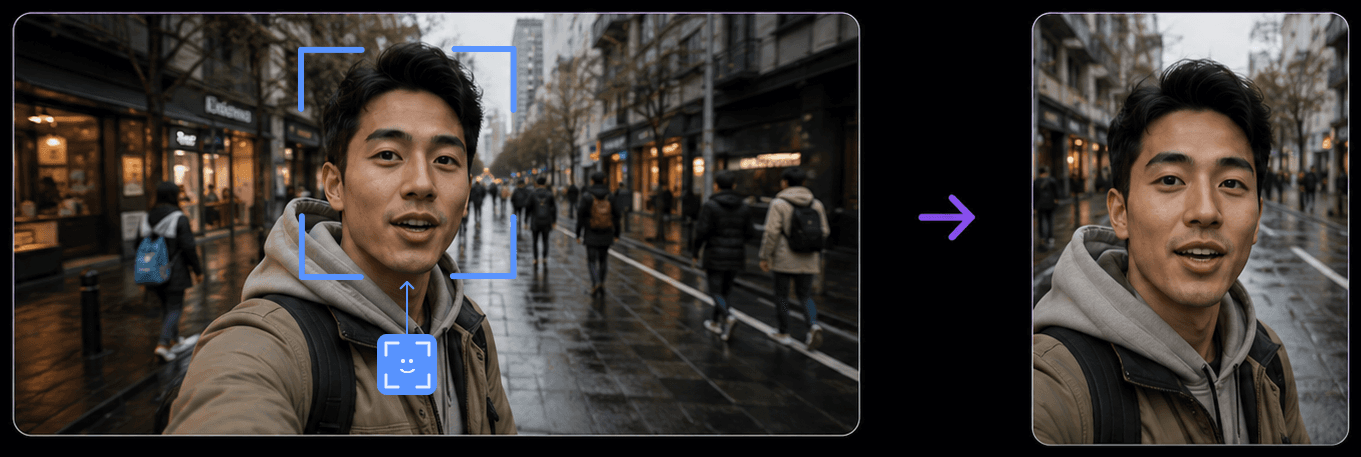
Auto-framing for IRL live streams
IRL streamers shoot horizontal from their phone or action camera but most short-form audiences watch vertical. Streamrun creates the vertical version for you automatically and keeps you in frame as you move around the scene. No second camera, manual cropping, or separate vertical setup to design.
Behind the scenes, AI-based auto-framing tracks where the face is positioned and pans the vertical crop to follow it. This is not a one-time detection at the start of the stream. The crop updates continuously, frame by frame. If the talent steps left or right, the framing pans with them. If they walk across the scene, the vertical crop catches up smoothly. For talking-head segments and walkaround IRL, it feels like a dedicated vertical camera operator is following them. For a full IRL workflow walkthrough, see the IRL streaming guide.
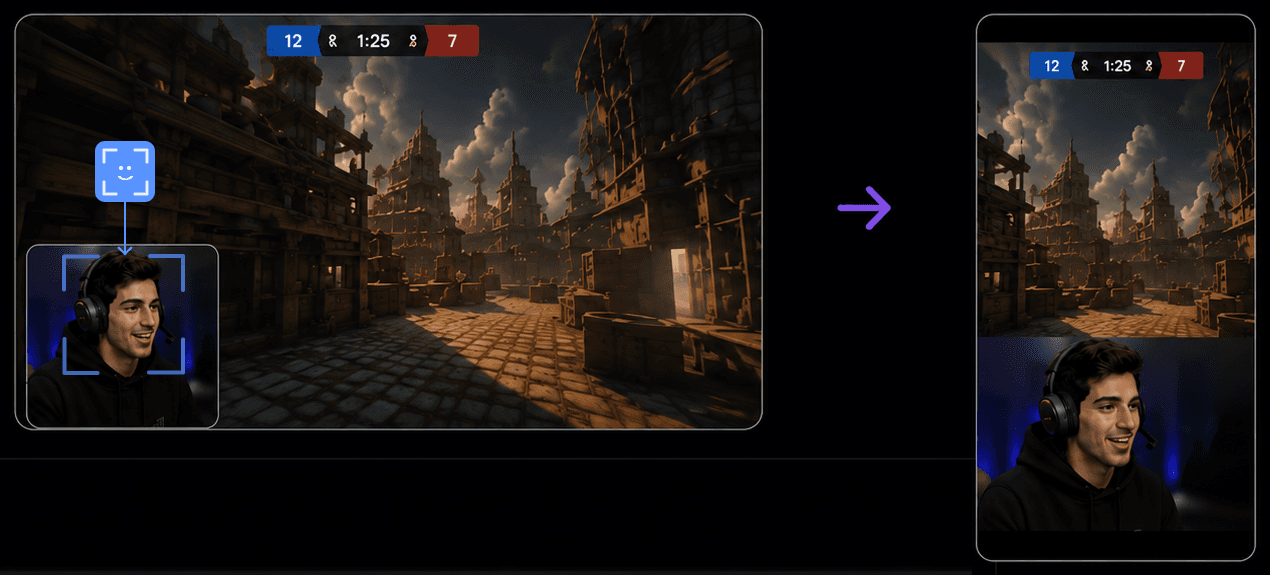
Gaming facecam layout
Gaming streams pose a different problem. Cropping a 16:9 gameplay frame to 9:16 cuts off most of the game UI. A simple vertical crop usually looks wrong, and auto-framing alone does not solve it when the game itself is the subject.
Streamrun detects the facecam region in your horizontal scene and produces a stacked vertical layout. The game crop sits on top, the face camera sits below, and the proportions are chosen to keep the action visible while the streamer stays prominent. That gives you a vertical stream that still makes sense on mobile, without redesigning every scene by hand.
Twitch Dual Format setup
Twitch supports native dual format ingest. One stream key is enough for both orientations, and Twitch serves the right orientation to each viewer. Streamrun packages the horizontal and vertical outputs into Twitch's dual format feed automatically.
- 1
Add Twitch as a destination
From your Streamrun stream, add Twitch and connect your account. The destination type to pick is Twitch Dual Format.
- 2
Stream into Streamrun as usual
Point your device at your Streamrun ingest URL. Auto layout is fully automatic: Streamrun detects a webcam in your scene and uses the gaming facecam layout, or falls back to IRL auto-framing when there is no webcam to anchor on. Nothing to configure on your end.
- 3
Reach both audiences with one stream
Desktop viewers see the horizontal feed, mobile viewers see the vertical version, all from one stream key.
Multistream horizontal and vertical with Streamrun Pro
Twitch is the only platform with native dual format ingest today, but more are coming.Streamrun Pro allows multistreaming to many destinations from your single upload, and each destination can be assigned the orientation it needs.
Mix horizontal and vertical destinations freely. A typical multi-platform setup might look like:
- Twitch: one Twitch Dual Format destination, both orientations from a single stream key.
- Kick: horizontal output for the desktop audience.
- YouTube Live: two stream keys, one for horizontal and one for vertical Shorts-style live.
- TikTok and Instagram: vertical destinations fed by the same auto-framed stream.
The framing is applied server-side and the bandwidth, encoding load, and routing all stay in the cloud. See multi-platform streaming for a deeper look at the multistreaming workflow.
Troubleshooting and FAQ
Common questions about automatic dual format streaming and live auto-framing with Streamrun.
What is automatic dual format streaming?
Automatic dual format streaming means sending one live stream and getting both horizontal and vertical outputs delivered to your platforms. With Streamrun, the horizontal output runs as normal and the vertical version is created automatically with live auto-framing, so you reach both audiences without a local plugin, second device, or second upload.
What is automatic vertical streaming?
Automatic vertical streaming is the cloud-based half of dual format that handles the vertical version for you. Instead of designing a vertical scene in OBS or running a second device, you stream horizontally as you normally would and Streamrun creates the vertical 9:16 output automatically with live auto-framing. Your horizontal output continues unchanged.
Do I need OBS or a plugin to use this?
No. Streamrun accepts any RTMP or SRT input from any encoder or mobile app. Auto-framing and the dual format outputs run server-side, so the same setup works for OBS, Streamlabs, vMix, Moblin, Larix, IRL Pro, Prism, and any hardware encoder.
How does auto-framing for live streams work?
Streamrun uses AI-based detection to locate where the streamer is positioned inside each video frame, then pans the vertical crop to keep that position centered. This is positional detection only: the model finds where the streamer is positioned in the frame, not who the person is, and there is no identity recognition involved. The tracking runs continuously throughout the stream, not just once at the start, so the crop follows the talent as they move around the scene. Streamrun Pro adds the ability to override the live tracking and lock the crop to a fixed region from the dashboard.
Can Twitch show both orientations from a single Streamrun stream?
Yes. Twitch supports native dual format ingest, so Streamrun sends one dual-format feed to a single Twitch destination and Twitch serves the right orientation to each viewer. Mobile viewers see vertical, desktop viewers see horizontal, all from one stream key.
What about YouTube and Kick?
Streamrun sends the appropriate orientation to each destination separately: horizontal to Kick, horizontal or vertical to YouTube Live, and the matching vertical output to TikTok or Instagram. All routing happens server-side from your single upload.
Does this work for mobile-only streamers?
Yes, and this is one of the clearest use cases. Mobile streamers can only send one orientation from their phone. Streamrun generates the other format automatically and distributes both to the right platforms, with no extra device or app required.
What is the latency impact?
Adding the cloud hop and server-side framing adds a small amount of latency compared with a direct stream to a single destination. In return, the cloud layer handles automatic dual format processing, per-destination routing, disconnect protection, and automated failover, which are hard to replicate locally. For most live streaming use cases this is well within normal viewer expectations. For ultra-low-latency interactive streams, test on your specific path before committing.
Related
What Is Dual Format Streaming?
The concept, the platforms involved, and how the different approaches compare.
Streamrun Pro
The plan that powers automatic dual format, multistreaming, and full workflow control.
IRL Streaming Guide
How auto-framing fits into a phone-based IRL workflow with vertical and horizontal audiences.
Multi-Platform Streaming
Simulcast to Twitch, YouTube, Kick, TikTok, and Instagram from a single upload.
One stream in. Both formats out.
Get automatic dual format streaming with live auto-framing for IRL, stacked layouts for gaming, native Twitch Dual Format ingest, and per-platform routing everywhere else.